
Overview
ClearSync can include recurring revenue that is collected outside Stripe. There are two implementation paths:
- Recommended: Create and manage the subscription in Stripe, while recording each invoice as paid outside Stripe.
- Fallback: Create and maintain the corresponding ClearSync Subscription and Event records and HubSpot Payment records yourself.
Our recommendation: When practical, use Stripe as the subscription system of record even when the customer pays by check, wire transfer, ACH handled elsewhere, or another external payment method. This gives Stripe, ClearSync, and your other Stripe integrations a consistent, forward-looking subscription data set.
Recommended: Manage the subscription in Stripe and collect payment elsewhere
Stripe supports representing external subscriptions with manually collected invoices. Set the subscription's billing method to Send invoice rather than automatically charging a saved payment method. Stripe will generate an invoice for each billing period, and you can mark the invoice as paid outside Stripe after the payment is confirmed in your external system.
A typical process is to:
- Create or select the Stripe Customer.
- Create the subscription using the appropriate Stripe Product, Price, quantity, billing interval, and start date.
- Select Send invoice as the billing method. Stripe documents this as the manual collection method.
- Collect the payment through the external channel.
- After the payment is confirmed, open the Stripe invoice and mark it Paid outside Stripe. Through the API, this is the paid_out_of_band option.
- ClearSync will then sync the resulting subscription, event, payment, property mappings, and associations into HubSpot.
Recommendation: Mark an invoice paid outside Stripe only after you confirm the external payment. Stripe treats the paid status as final, so you can no longer edit the invoice.
Why this is the preferred approach
Keeping the subscription in Stripe provides several advantages:
- Stripe contains the current subscription, products, prices, quantities, billing cadence, invoices, and payment status.
- ClearSync can use its normal synchronization path instead of relying on a separate custom data pipeline.
- ClearSync applies field mappings, record creation, and configured associations consistently.
- Other Stripe integrations can use the same subscription and invoice data.
- Subscription changes in Stripe can produce the expected downstream New, Upgrade, Downgrade, and Churn movements.
- Your team has fewer custom workflows, mappings, association rules, and duplicate-prevention controls to maintain in HubSpot.
Stripe fee considerations
Stripe's payment processing fee does not apply to an invoice marked paid outside Stripe, since Stripe didn't move the money.
However, Stripe Billing fees might still apply. What matters is how the invoice was created, not how it was paid:
- Automatically generated Stripe invoices for Subscriptions (produced by a recurring billing cycle) do count toward Billing volume, whether paid on or off Stripe.
- One-off invoices (created manually) are excluded.
Conclusion: Issuing manual, one-off invoices for Subscriptions paid outside of Stripe should avoid any Stripe Billing fees (currently .7%).
Billing pricing, volume tiers, and custom contracts vary by account. Confirm with Stripe how this will be billed on yours before representing a meaningful amount of external revenue this way.
Backdating Considerations
Once configured, each new billing period and externally collected payment can be represented in Stripe as it occurs.
Stripe does support backdating subscriptions, including creating a backdated subscription without charging for the elapsed period. Backdating can help carry forward a subscription's original start date or next billing date during a migration.
However, backdating does not provide a general-purpose way to recreate an exact historical sequence of subscriptions, invoices, payment dates, upgrades, downgrades, and churn events that occurred before Stripe records existed. Treat historical migration as a separate data project and test how any backdated records will affect ClearSync and reporting before relying on them.
For most migrations, start the Stripe-managed process from a clear cutover date. Preserve older history in the existing system or import only the historical records needed for reporting into HubSpot as normalized ClearSync records.
Fallback: Create ClearSync records directly in HubSpot
If the subscription cannot be represented in Stripe, you can manually or systematically create the corresponding records in HubSpot:
- A ClearSync Stripe Subscription record representing the current subscription state.
- A ClearSync Stripe Event record for each New, Upgrade, Downgrade, or Churn movement.
- The relevant HubSpot Payment records representing payments collected outside Stripe.
- Associations among the Subscription, Events, Payments, Company, Contact, Deal, and any other records used by your reporting or automation.
Authorized HubSpot users can create ClearSync App Object records manually. For repeatable processes, HubSpot workflows can create and update them based on a Deal, Company, external-system signal, or another business trigger.
See Working with ClearSync App Objects in HubSpot Workflows & Custom Automations for the recommended workflow, association, custom code, and webhook guidance.
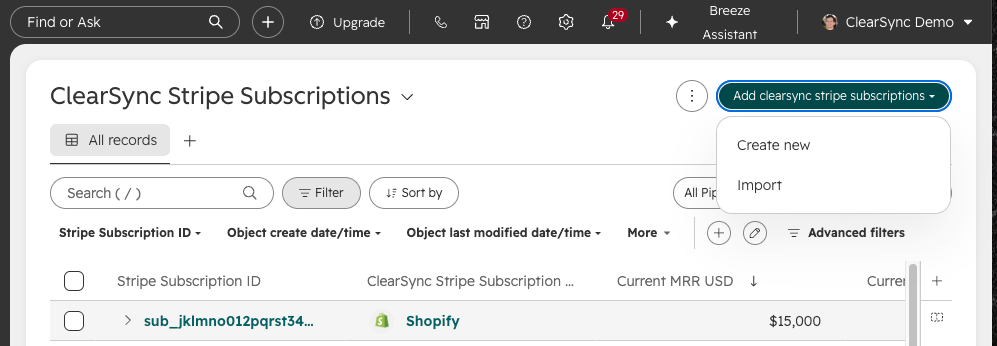
Manually create or import data into ClearSync’s objects:
What you must manage yourself
When you bypass Stripe and create the records directly in HubSpot, your process is responsible for:
- Mapping every required subscription, event, and payment property.
- Applying the same MRR amount, event-type, date, currency, and status conventions used by Stripe-originated ClearSync records.
- Creating and maintaining all required associations.
- Creating new Event records whenever recurring revenue changes.
- Updating the Subscription record as the current state changes.
- Preventing duplicate Subscription, Event, and Payment records.
- Storing stable source-system identifiers and audit properties.
- Handling corrections, retries, late-arriving payments, and out-of-order updates.
- Testing downstream workflows and reports that expect Stripe-originated data.
Manual and workflow-created records can participate in supported HubSpot automation and reporting, but they will only be as complete and consistent as the process that creates them.
Which option should you choose?
Situation | Recommended approach |
Subscription is active and future invoices can be represented in Stripe | Create the subscription in Stripe, use Send invoice, and mark confirmed external payments as paid outside Stripe |
You want ClearSync and other Stripe integrations to receive one consistent data set | Use Stripe as the subscription system of record |
The subscription cannot be represented in Stripe | Create and maintain the ClearSync Subscription, Event, and HubSpot Payment records in HubSpot |
You need exact history from before the migration | Treat historical migration separately; do not assume a new or backdated Stripe subscription will recreate the original event and payment timeline |