
Sometimes you might notice that a billing contact in Stripe is not appearing in HubSpot as a new contact when syncing via ClearSync. This could be for a few reasons.
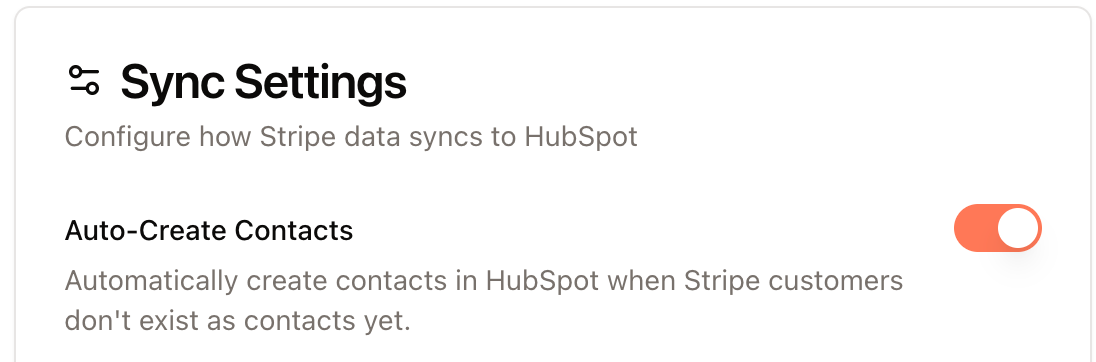
- “Auto-Create Contacts” setting is off.
- ClearSync has a a setting called “Auto-Create Contacts”. If this is OFF, ClearSync will not create brand new contacts in HubSpot for you. If you’d like this on, simply navigate to “Data Sync” in ClearSync and toggle it on. ClearSync will start creating contacts in HubSpot for you going forward.
Note: ClearSync does not create duplicate contacts in HubSpot. If we find a contact that has that email address already in HubSpot, we will not create a duplicate.
- The Stripe billing contact’s email address is misspelled or invalid.
- Stripe does not enforce having a valid email address to create a billing contact. On the other hand, HubSpot does enforce that all contacts have a valid email address when creating them as a contact in the CRM. This can cause issues when Stripe sends a misspelled email address like rachel@ggmail.com as a contact to HubSpot. HubSpot will reject creating this email address as a contact because it knows that the email address is invalid.
So if you are expecting that the email address should be created as a contact, first validate that the email address is valid as according to HubSpot. If it’s misspelled or incorrect, update the email address in Stripe and re-sync that to ClearSync, which will then push it to HubSpot.
A best practice here is to add email validation to billing forms in your product to prevent invalid email addresses from getting created in Stripe.
If neither of these things apply to your situation, please reach out to support@clearsync.ai with more information about your situation and we’ll assist!