
If you're seeing a discrepancy between ClearSync and Stripe’s MRR numbers on Stripe’s Billing Overview page, it is likely because of settings differences between the two platforms and some SaaS best practices that ClearSync has built-in that aren’t reflected in Stripe’s data. Let’s dig into some common differences between how Stripe and ClearSync calculate MRR.
1. Discounts
Stripe shows MRR at full list price by default, unless the subscription has a recurring permanent coupon. This means that one-time and temporary recurring discounts are not subtracted from MRR unless you manually configure the setting in your Stripe Billing Overview settings.
ClearSync always reflects the one-time, temporary, and recurring discounted price the customer is paying at every level by default (invoice-level, line-item level, customer-level, and subscription-level). We believe that discounts should always be taken out of MRR calculations and have built that into the logic.
Example: A customer on a $1,200/year plan with a one-time 20% discount:
Stripe’s default behavior | ClearSync | |
Annual invoice | $1,200 per year | $1,200 per year |
One-time 20% discount | ❌ Discount isn’t subtracted from MRR by default | ✅ -$240 discount (20% off) accounted for, so the subtotal is $960 ($1,200-$240) |
MRR shown | $100/month ($1200/12) | $80/month ($960/12) |
ClearSync's $80/month reflects what the customer is actually paying currently, after discount and before any tax. Stripe's $100/month reflects the list price before discounts.
2. Subscription Cancellation Timing
By default, Stripe counts a subscription as canceled and as $0 MRR as soon as the customer requests to cancel. If they are on an annual subscription and still have 6 months of their subscription left, Stripe counts those remaining 6 months as $0 MRR.
Conversely, ClearSync counts a subscription as canceled and as $0 MRR the day the subscription transitions from
active to canceled. If the customer is on an annual subscription and still has 6 months of their subscription left, ClearSync won’t process the cancellation as $0 MRR in our reports until the 6 months is complete and the subscription status officially transitions from active to canceled. 3. Differences in Currency
Stripe shows your MRR in the default currency of your account or the default currency you have set for that customer. Stripe has their own currency conversion tables and settings you can use to determine how you collect and calculate payments and billing in the customer’s local currency or your pricing table’s default currency. The settings of your Stripe account will determine how Stripe calculates MRR for a particular subscription.
ClearSync’s dashboard shows all MRR in the currency subscriptions are collected in. However, when syncing the MRR data to HubSpot, we use the HubSpot account currency conversion table to convert the MRR to your default HubSpot currency.
If your default Stripe currency is in USD and your HubSpot account currency is set as EUR as the default, we will show the currency both in USD and convert the currency to EUR when syncing it to HubSpot. This allows you to use our currency fields to calculate MRR in HubSpot in the currency that makes sense for your business.
4. “Unpaid” Subscription Status
Stripe does not count Subscriptions in the “Unpaid” status as MRR, while ClearSync does by default. We recommend using the “Unpaid” status as a way to continue recognizing MRR for a subscription that’s completed the Past Due dunning status but is still likely to be resumed (since one a Subscription in Stripe is fully canceled, it can’t be brought back).
If you need to filter out Subscriptions that are in this status from your MRR calculations, you can use HubSpot Report filters to do so.
5. Data Delays
Stripe’s MRR data is typically 24-48 hours old, while ClearSync’s data is in near real-time.
How to Reconcile the Numbers
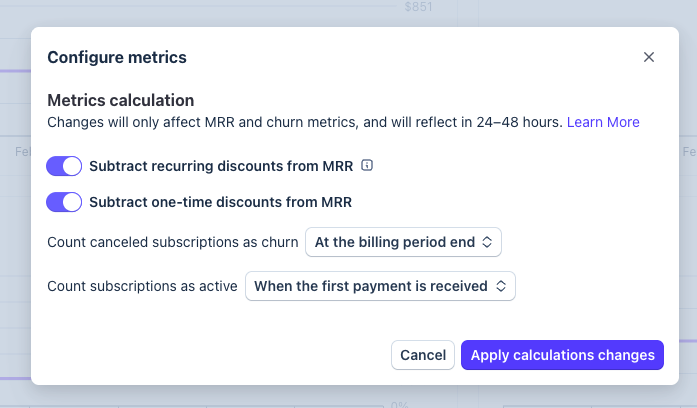
If you’re looking to compare ClearSync’s MRR data to Stripe’s, we recommend first updating a few crucial settings in Stripe:
- In Stripe, go to Billing Overview → Configure and turn on "Subtract recurring discounts from MRR", "Subtract one-time discounts from MRR.", Count canceled subscriptions as churn “At the billing period end”, and Count subscriptions as active “When the first payment is received”. Allow 24-48 hours to process.
- Export MRR per subscriber per month from Stripe's MRR Growth chart, not the Subscriptions export. Make sure you export “All time” data which isn’t the default.
- Compare to ClearSync's Subscription export, which you can export from HubSpot, matched by Stripe Customer ID.
- Account for differences in currency conversions for each subscription when calculating the differences.
Further Reading
For further reading on how ClearSync calculates MRR across all edge cases, see our full methodology post: The Hidden Complexity of MRR
For details on how Stripe calculates MRR, see their documentation here.
Still seeing a discrepancy you can't explain? Book a call with us, and we'll walk through it together.