
Example Use Case: Integrating Stripe self-service subscription management with sales Deals
When a new subscription sale or upgrade occurs in Stripe, check for any existing open Deals associated with the HubSpot Contact that corresponds to the Stripe Billing Email. If we find one, update the Deal to Closed Won and update the MRR/ARR on the Deal Amount.
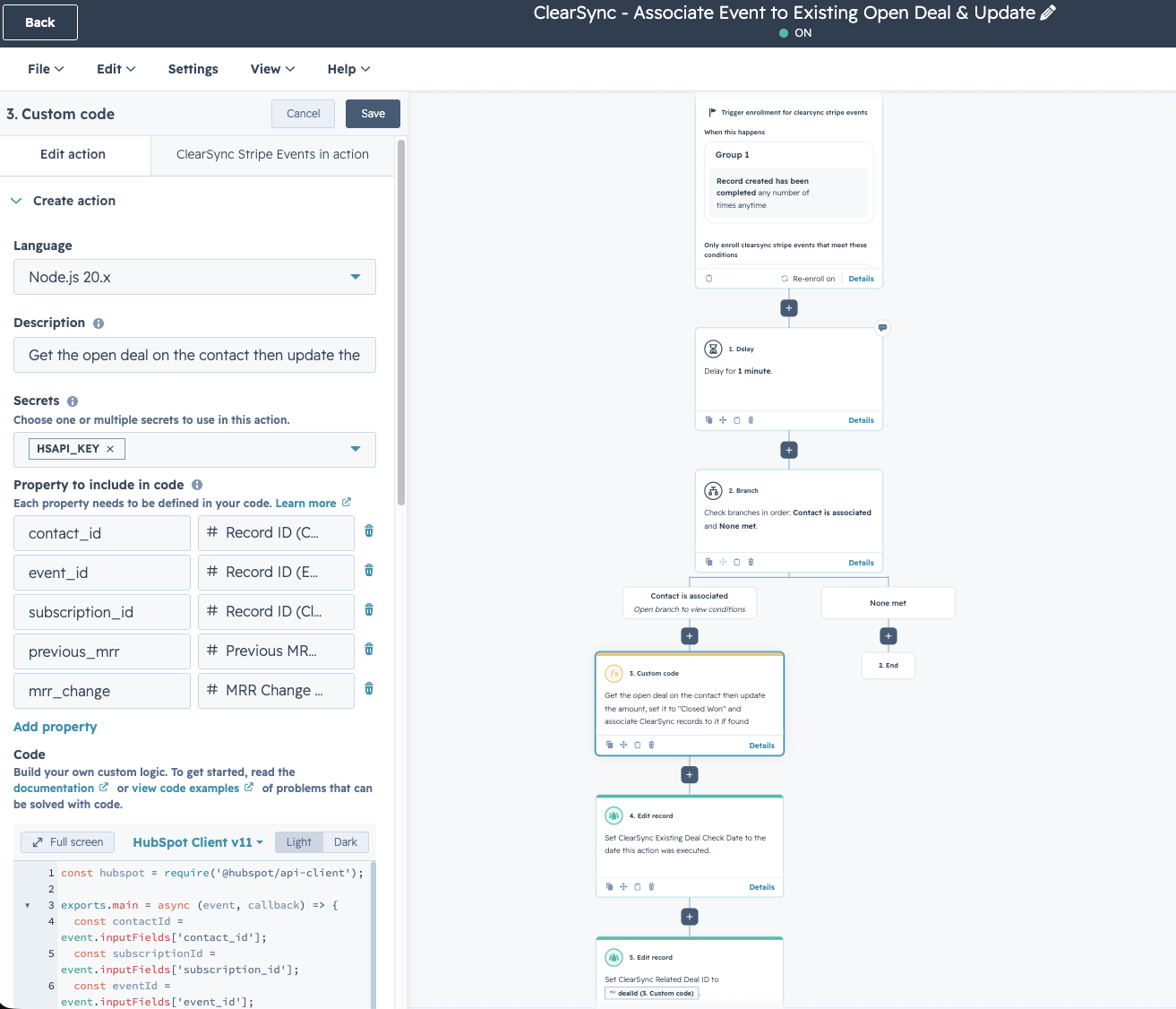
Logic for our example HubSpot Custom Code Workflow Action:
- Trigger: A newly created ClearSync Stripe Event with MRR Change > 0 and type = New Sale or Upgrade that is associated with a Contact
- (1) Search for an existing open Deal (where hs_is_closed_count = 0) that’s related to the Contact.
- If there are multiple, then find the Deal with the nearest Close Date
- (2) Update the Deal:
- (A) Take the previous/current value in the Deal Amount before updating, and store it in a newly created custom field “Amount Before Closed Automatically”
- (B) Set the Amount to the MRR Change from the ClearSync record
- (C) Update the dealstage to closedwon
- (D) Relate both the ClearSync Stripe Subscription & ClearSync Stripe Event that triggered the workflow to the Deal that was matched to and updated
- (E) New Sale vs Expansion Tagging:
- If MRR is going from $0 previously to something greater than $0, then set dealtype to newbusiness.
- Otherwise, if MRR is going from >$0 previous value, then set dealtype to existingbusiness
- (3) Also populate additional custom fields on the object:
- “ClearSync Existing Deal Check Date” on the Event, and also
- “ClearSync Related Deal ID”
javascriptconst hubspot = require('@hubspot/api-client');

exports.main = async (event, callback) => {
  const contactId = event.inputFields['contact_id'];
  const subscriptionId = event.inputFields['subscription_id'];
  const eventId = event.inputFields['event_id'];
  const previousMrr = event.inputFields['previous_mrr'];
  const mrrChange = event.inputFields['mrr_change'];

  const isNew = Number(previousMrr) === 0;

  const hs = new hubspot.Client({
    // Use a HubSpot Service Key for this
    accessToken: process.env.HSAPI_KEY
  });

  const contact = await hs.crm.contacts.basicApi.getById(
    contactId,
    [],
    [],
    ["DEAL"],
  );

  const deals = await hs.crm.deals.batchApi.read({
    inputs:
    contact.associations?.deals?.results.map((id) => ({ id: id.id })) ??
    [],
    properties: [
      "amount",
      "closedate",
      "hs_is_closed_count",
    ],
    propertiesWithHistory: [],
  });

  const openDeals = deals.results.filter(
    (d) => Number(d.properties.hs_is_closed_count) === 0,
  );

  const nearestClose = openDeals.sort(
    (a, b) =>
    new Date(a.properties.closedate).getTime() -
    new Date(b.properties.closedate).getTIme(),
  ).at(0);

  if (!nearestClose) return callback({outputFields: {}});

  console.info({
    dealId: nearestClose.id,
    dealAmount: nearestClose.properties.amount,
    contactId,
    subscriptionId,
    eventId,
    mrrChange,
    previousMrr,
    isNew,
  });

  await hs.crm.associations.v4.basicApi.create(
    "DEAL",
    nearestClose.id,
    "a10608503_cls_stripe_subscription",
    subscriptionId,
    [],
  );
  await hs.crm.associations.v4.basicApi.create(
    "DEAL",
    nearestClose.id,
    "a10608503_cls_stripe_transaction",
    eventId,
    [],
  );
  await hs.crm.deals.basicApi.update(
    nearestClose.id,
    {
      properties: {
        amount_before_closed_automatically: nearestClose.properties.amount,
        amount: mrrChange,
        dealstage: "closedwon",
        dealtype: isNew ? "newbusiness" : "existingbusiness",
      },
    }
  );

  return callback({
    outputFields: { dealId: nearestClose.id }
  });
}