
Example HubSpot Company with Rollup & Property Sync data from Stripe via ClearSync:
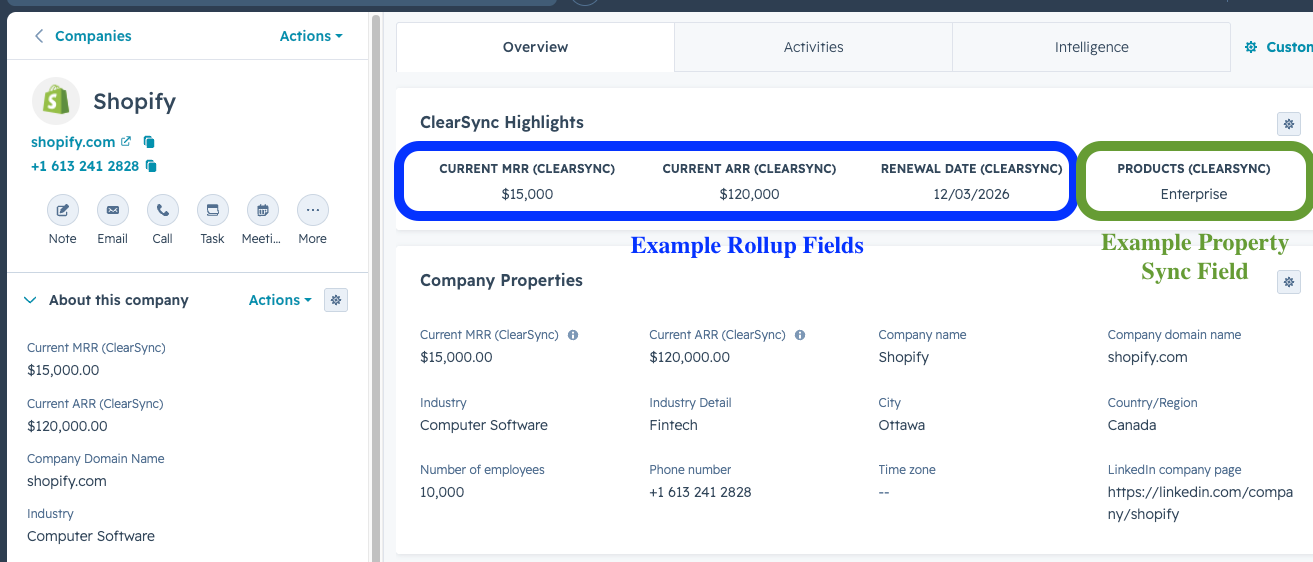
Helpful Rollup Fields to Create in HubSpot using ClearSync data:
👉 How to think about using Rollup fields vs ClearSync objects for reporting:
Rollup Field | Object | Field Criteria |
Current MRR (CLS) | Company | Description: The Currently Active MRR, converted into your HubSpot default currency, that’s attributed to a HubSpot Company, based on the sum of Current MRR across all ClearSync Stripe Subscriptions related to the Company.
• Property Label: Current MRR (CLS)
• Field Type: Rollup
• Rollup Type: Sum
• Number Format: Currency
• Choose the Associated Record Type:
◦ ClearSync Stripe Subscription
• Choose the Associated Record Property:
◦ Current MRR Amount Company Currency
• Conditions: None |
Current ARR (CLS) | Company | Description: The Currently Active ARR, converted into your HubSpot default currency, that’s attributed to a HubSpot Company, based on the sum of Current ARR across all ClearSync Stripe Subscriptions related to the Company.
• Property Label: Current ARR (CLS)
• Field Type: Rollup
• Rollup Type: Sum
• Number Format: Currency
• Choose the Associated Record Type:
◦ ClearSync Stripe Subscription
• Choose the Associated Record Property:
◦ Current ARR Amount Company Currency
• Conditions: None |
Current MRR (Contact) | Contact | • Property Label: Current MRR (Contact)
• Field Type: Rollup
• Rollup Type: Sum
• Number Format: Currency
• Choose the Associated Record Type:
◦ ClearSync Stripe Subscription
• Choose the Associated Record Property:
◦ Current MRR Amount Company Currency
• Conditions: None |
Current ARR (Contact) | Contact | Property Label: Current ARR (Contact)
• Field Type: Rollup
• Rollup Type: Sum
• Number Format: Currency
• Choose the Associated Record Type:
◦ ClearSync Stripe Subscription
• Choose the Associated Record Property:
◦ Current ARR Amount Company Currency
• Conditions: None |
Had Paid Event (CLS) | ClearSync Stripe Subscription | Pre-requisite: Number of Paid MRR Events (see below)
Description: A binary field used to tell us whether the subscription has ever had a paid MRR event, used for trial conversion reporting.
Create a Calculation field where:
• Calculated Property Type = Custom equation
• Output Type = Boolean
• Formula = ([properties.number_of_paid_events] > 0) |
Next Renewal Date (CLS) | Company | Description: The next/earliest upcoming paid renewal date for an active paid subscription associated to the Company.
• Field Type: Rollup
• Rollup Type: Earliest date
• How should this date appear on records?: Show date only
• Choose the Associated Record Type:
◦ ClearSync Stripe Subscription
• Choose the Associated Record Property:
◦ Current Period End
• Conditions: Current MRR is greater than 0 |
Number of Paid MRR Events | ClearSync Stripe Subscription | Description: Tells us whether a given Subscription ever had paid MRR associated with it. Helpful for driving “Former Customer” Lifecycle Stage and list building.
Property Label: Number of Paid MRR Events
• Field Type: Rollup
• Rollup Type: Count
• Number Format: Unformatted number
• Choose the Associated Record Type:
◦ ClearSync Stripe Event
• Choose the Associated Record Property:
◦ Record ID
• Conditions: Updated MRR is greater than 0 |
MRR High Watermark (CLS) | ClearSync Stripe Subscription | Description: Tells us the highest MRR that a given Subscription has achieved during it’s lifetime.
Property Label: MRR High Watermark (CLS)
• Field Type: Rollup
• Rollup Type: Max
• Number Format: Currency
• Choose the Associated Record Type:
◦ ClearSync Stripe Event
• Choose the Associated Record Property:
◦ Updated MRR
• Conditions: None |
Number of Paid MRR Events (Company) | Company | Same as above, but at the Company-level. |
Helpful Property Sync Fields to Create in HubSpot using ClearSync data:
👉 How to think about using Property Sync fields with ClearSync data:
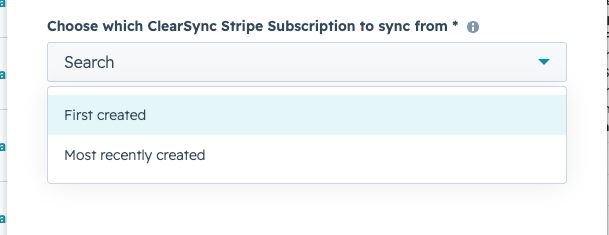
Property Sync Field | Object | Field Criteria |
Current Product (CLS) | Company and/or Contact | Description: Returns the Stripe Product Name(s) for the most recently created Stripe Subscription associated to the Company or Contact.
• Field Type: Property Sync
• Choose the Associated Record Type:
◦ ClearSync Stripe Subscription
• Choose the Associated Record Property:
◦ Product Name
• Choose which ClearSync Stripe Subscription to sync from:
◦ Most Recently Created |
Current Billing Interval (CLS) | Company and/or Contact | Description: Returns the Stripe Billing Interval (e.g. Monthly, Annual, Semi-annual, Custom) for the most recently created Stripe Subscription associated to the Company or Contact.
• Field Type: Property Sync
• Choose the Associated Record Type:
◦ ClearSync Stripe Subscription
• Choose the Associated Record Property:
◦ Billing Interval
• Choose which ClearSync Stripe Subscription to sync from:
◦ Most Recently Created |