
How ClearSync Syncs Stripe Payment Data to HubSpot
ClearSync syncs your Stripe payment data to HubSpot in two ways:
- Individual HubSpot Payment records: every Stripe payment tied to a subscription becomes a record in HubSpot’s native Payments object, associated with that subscription.
- Total Subscription Spend field in HubSpot: a cumulative, lifetime total on the ClearSync Stripe Subscription object, so you can see what a subscription has paid without leaving a subscription record. You can roll it up onto the HubSpot Contact or Company to understand and segment by customer Lifetime Value (LTV).
Neither are the same as MRR or MRR change event records, which keep track of what a subscription is expected to pay in the future. . Payments and Total Subscription Spend are backward-looking ‘cash in the bank’ events that show what’s actually been collected.
For example, if a customer added a user to their subscription mid-month, the prorated payment record might show $50 for their first half-month, but the MRR change event for the same transaction would reflect an Upgrade MRR event for $100.
HubSpot Payment Records
For every Stripe Charge or Payment Record tied to a subscription, ClearSync creates a corresponding record in HubSpot’s native Payments object. That means:
- Payment history shows up in HubSpot’s native Payments experience, not just a ClearSync app object.
- You can use HubSpot’s own payment properties in workflows and custom reports, the same way you would if the payment had run through Commerce Hub directly.
- Each Payment record is associated back to the relevant ClearSync Stripe Subscription, so you can navigate between the two and create sync or rollup fields.
Note: only Stripe charges or payment records tied to a Stripe subscription are synced this way. Standalone Stripe payments with no subscription attached (e.g. for one time charges not on a subscription) aren’t synced into HubSpot’s Payments object currently.
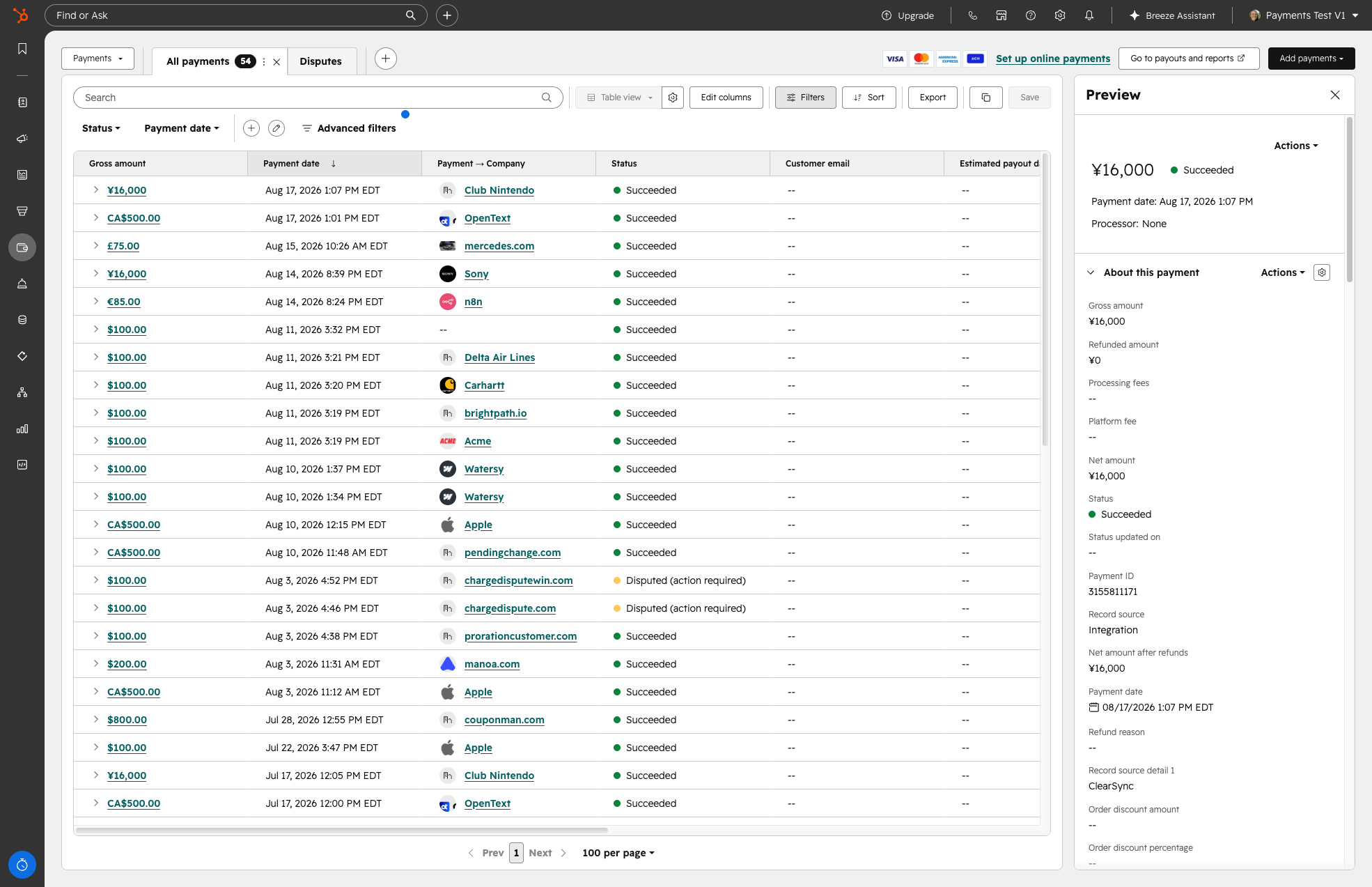
HubSpot Payment Record Properties ClearSync Populates
HubSpot Payment Property | Populated From |
Amount Paid | Stripe Charge / Payment Record amount, after refunds |
Currency code | The currency the payment was made in in Stripe |
Settlement currency code | The currency any dispute settlement payment was made in in Stripe |
Gross Amount | The original Stripe Charge / Payment Record amount, before refunds |
Net Amount | The total amount collected after fees and refunds from Stripe Charges and Payment Records. |
Net amount after refunds | Gross amount minus any refunds from Stripe Charges and Payment Records. |
Refunded Amount | The total amount refunded on this payment from Stripe Charges. |
Status | Stripe payment status (Succeeded, Processing, Refunded, Partially refunded, Failed, etc.) |
Object create date/time | When the record was created in HubSpot |
Object last modified date/time | When the record was last updated in HubSpot |
Payment Date | Date and time the payment was processed in Stripe |
Reference number | The Stripe Charge or Payment Record ID |
External Reference ID | The Stripe connected account ID and Charge/Payment Record ID, combined |
Payment ID | A HubSpot-generated identifier for the payment record |
Record source | How the record was created. Always “Integration” for Payment records created by ClearSync. |
Record Source Detail 1 | Identifies ClearSync as the integration that created the record |
ASSOCIATIONS | |
Associated ClearSync Stripe Subscription | The related ClearSync Stripe Subscription record. Present on every synced payment. |
Associated Contact | The matched HubSpot Contact, when ClearSync is able to match one |
Associated Company | The matched HubSpot Company, when ClearSync is able to match one |
Note: HubSpot requires a Professional or Enterprise Hub to use Payments data in workflows or reports. You can view individual Payment records on any HubSpot tier, but HubSpot itself restricts payment properties in workflows and custom reports to Professional and Enterprise. This is a HubSpot platform requirement, not a ClearSync limitation.
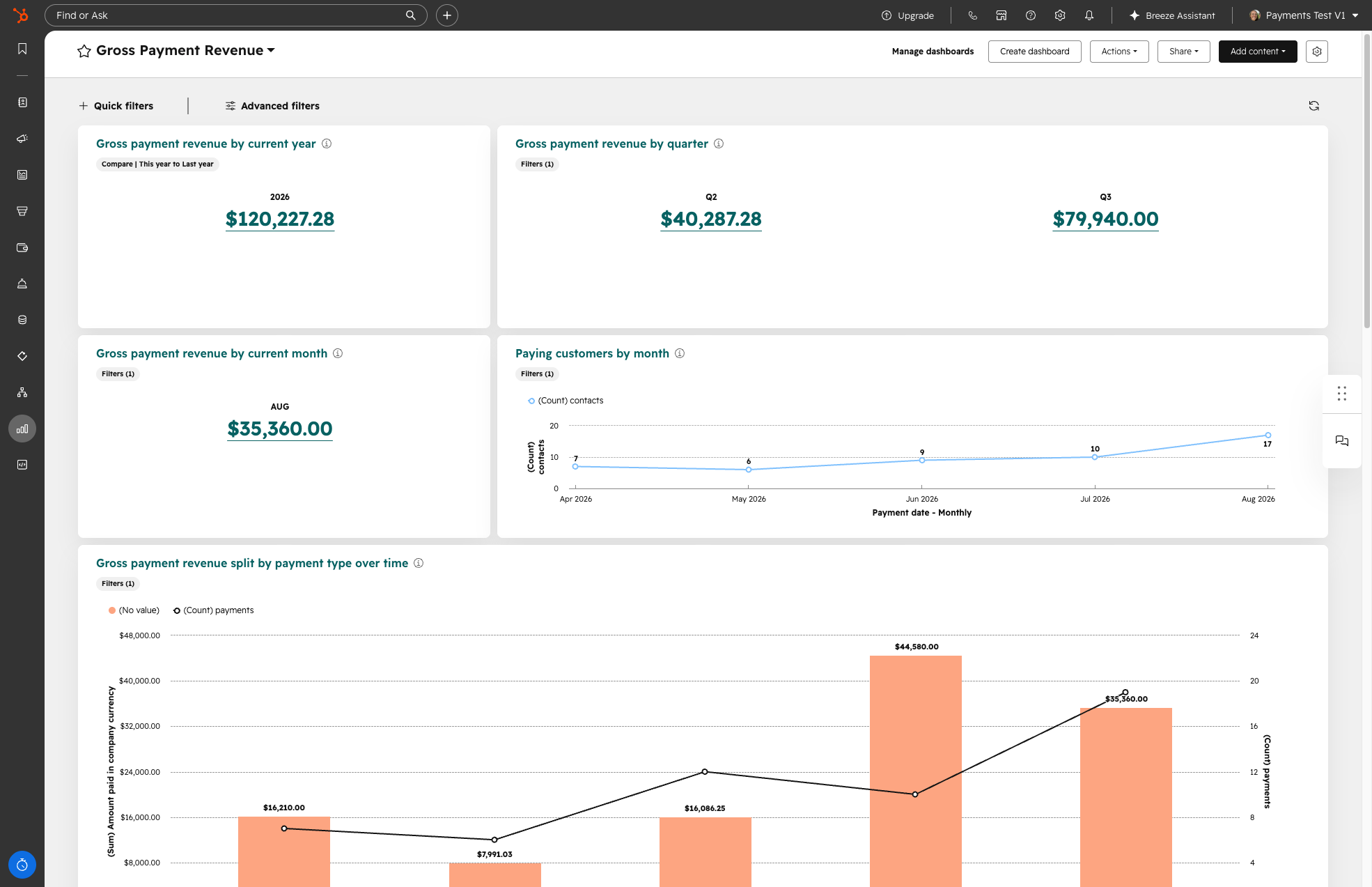
If you have HubSpot Professional and Enterprise, you can use the Payment record data to easily set up a Gross Payment Revenue dashboard made by HubSpot by following these instructions.
Total Subscription Spend
In addition to individual Payment records, ClearSync maintains a running lifetime total on the ClearSync Stripe Subscription record itself on a field called Total Subscription Spend.
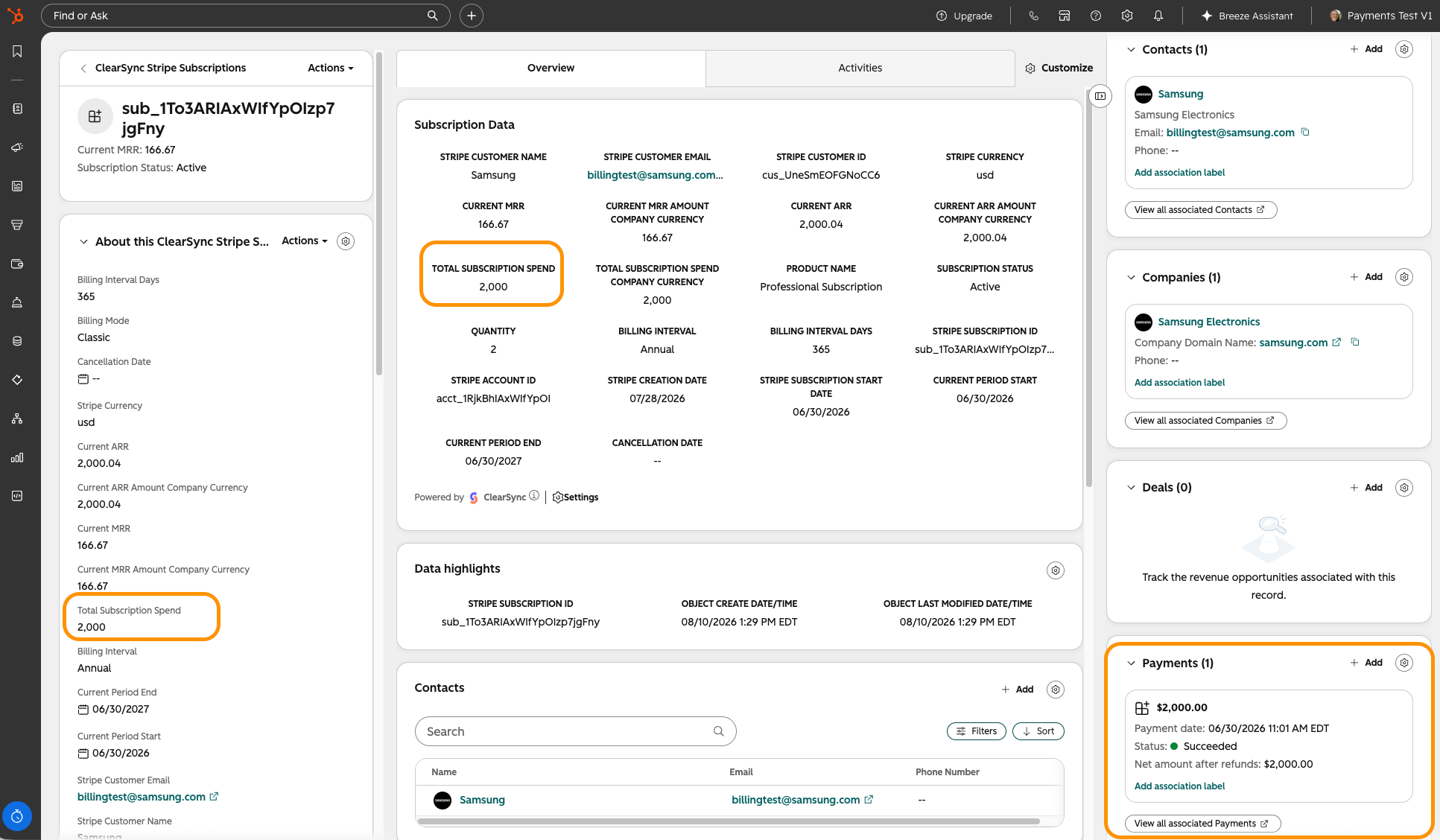
Data Included in Total Subscription Spend:
Included:
- Recurring subscription payments
- One-time charges attached to the subscription
- Metered / usage-based charges attached to the subscription
- Payments recorded via Stripe’s Payment Record object, if tied to the subscription. These are typically used to enter in payments collected externally outside of Stripe.
Excluded (for now):
- Payments not associated with any subscription. Support for these is planned in a future release, for both individual Payment records and Total Subscription Spend.
- Credits applied to an invoice. These are not currently subtracted from Total Subscription Spend.
Key Considerations
1. Refunds
Refund handling depends on which Stripe object the payment came from:
- Charges: refunds are subtracted from Total Subscription Spend, and reflected on the individual Payment record’s Status, in real time and in historical import.
- Payment Records: external payment records processed outside Stripe don’t automatically update when you refund them, so you’ll need to manually update the Payment record ClearSync created in HubSpot if an externally entered Stripe Payment is partially or fully refunded.
2. Credits
Credits are not currently subtracted from Total Subscription Spend, and don’t create a Payment record. If a customer has an active credit balance that will reduce a future invoice, that isn’t reflected in ClearSync’s data currently.
3. Non-Subscription Payments
If a payment in Stripe isn’t associated with a Stripe subscription (e.g. a one-time charge outside a subscription), ClearSync doesn’t sync it into HubSpot’s Payments object. Support for standalone, non-subscription payments is planned for a future release.
4. Disputes
A Payment record’s Status can show Disputed when Stripe reports a dispute. Dispute detail, such as the disputed amount, reason, or deadline, isn’t synced to HubSpot. You’ll know a payment is disputed, but you’ll need to check Stripe directly for the specifics.
How Your Data Appears
In HubSpot:
- Individual payments appear as records in HubSpot’s native Payments object, each associated with the relevant ClearSync Stripe Subscription.
- Total Subscription Spend is a field on the ClearSync Stripe Subscription object
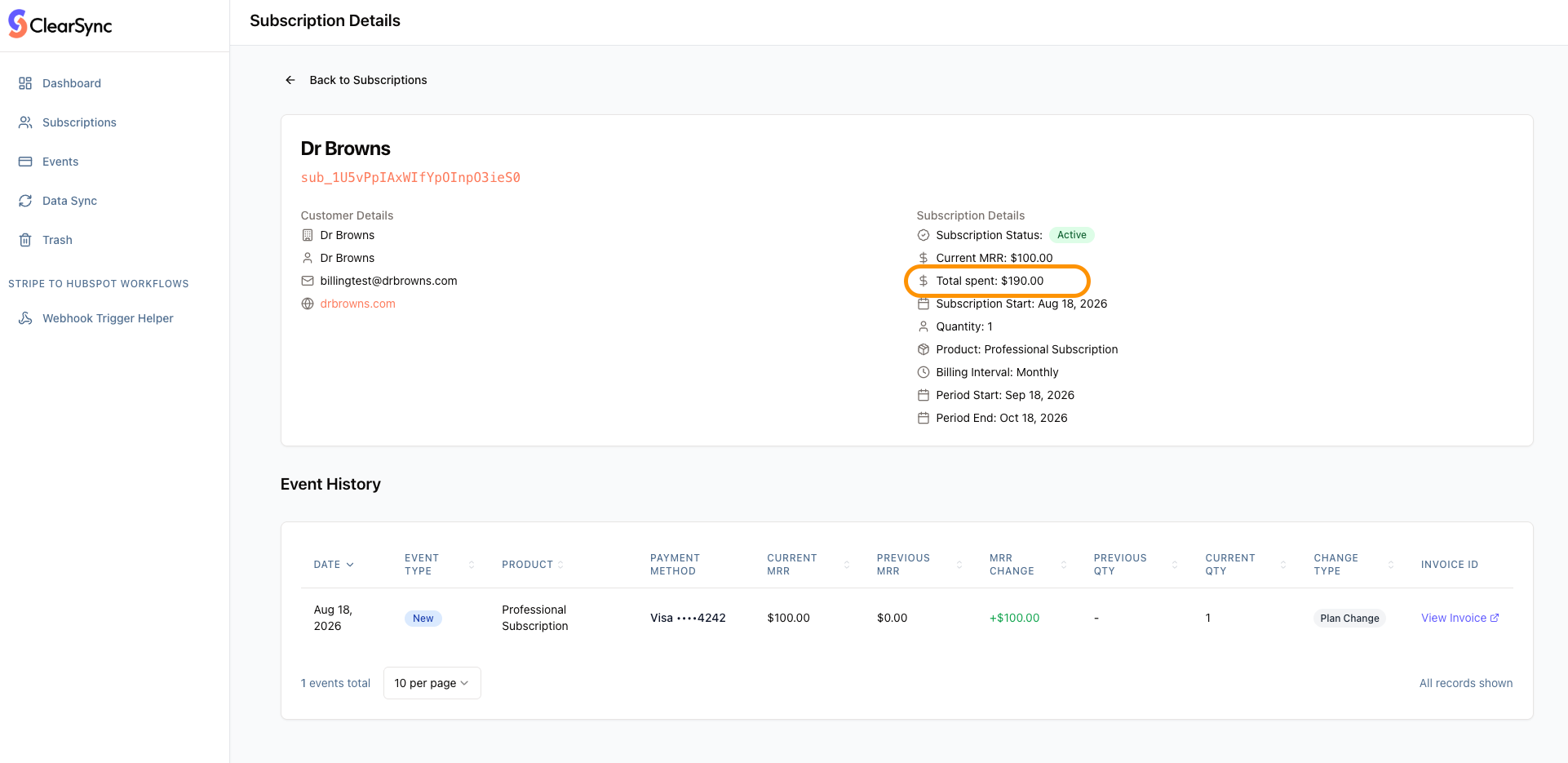
In ClearSync: the same lifetime total Total Subscription Spend appears as Total Spent on the Customer record inside the ClearSync app.
Summary
ClearSync gives you two complementary views of payment history: individual Payment records in HubSpot’s native Payments object for granular history and reporting, and a Total Subscription Spend rollup for an at-a-glance lifetime total on the ClearSync Stripe Subscription record itself. Use both alongside MRR, not instead of it. MRR tells you what to expect next month, Payments tell you what’s already in the bank.
MRR | Total Subscription Spend | |
Answers | “What’s this subscription worth per month?” | “How much has this subscription paid, total?” |
Data source | Stripe Subscriptions & Invoices | Stripe Charges & Payment Records |
One-time charges | Excluded | Included (if tied to the subscription) |
Metered / usage charges | Not included in MRR calculation (since these aren’t recurring charges) | Included |
Refunds | Excluded (adjusts past revenue, doesn’t change a forward-looking number) | Subtracted from the total |
Point in time | Current, forward-looking snapshot | Cumulative, lifetime-to-date |
Learn More
For how ClearSync calculates your forward-looking recurring revenue number, see How ClearSync Calculates MRR.