
Overview
ClearSync creates two HubSpot App Objects:
- ClearSync Stripe Subscriptions represent the current state of recurring subscriptions.
- ClearSync Stripe Events represent individual MRR movements such as new sales, upgrades, downgrades, and churn.
Stripe is the primary automated source for these records, but it does not have to be the only source. The records are extensible inside HubSpot: authorized users can create or edit them manually, workflows can create or update them, and customers can add custom properties and use the records in supported HubSpot automation.
Important API limitation: A customer-owned HubSpot Private App or Service Key cannot directly query, create, update, or delete App Object records through HubSpot's CRM APIs. The required App Object scopes belong to the ClearSync app that owns the objects and are not available to add to customer-owned credentials.
Most ClearSync customers use HubSpot workflows as their orchestration layer. You can use workflow actions to edit an enrolled ClearSync record, create records, branch on properties, and manage associations. Add custom code (with Data Hub Pro+) only when the decision logic is too advanced for native workflow branches and calculations.
Common use cases
You may want to extend or adjust ClearSync records when:
- You need to reclassify a replacement subscription from New Sale to Upgrade.
- You need to adjust an event's MRR change amount.
- A churn event represents a technical migration rather than true customer churn and should be neutralized or reclassified.
- You want custom properties that relate a replacement subscription to its predecessor or successor.
- You need to create associations with Contacts, Companies, Deals, Payments, or other supported records.
- Your company applies MRR or ARR rules that ClearSync cannot infer from Stripe alone.
- You need to represent recurring revenue managed outside Stripe, such as manually invoiced Enterprise contracts or app-store subscriptions.
Recommended implementation patterns
Option 1: HubSpot workflows (Recommended)
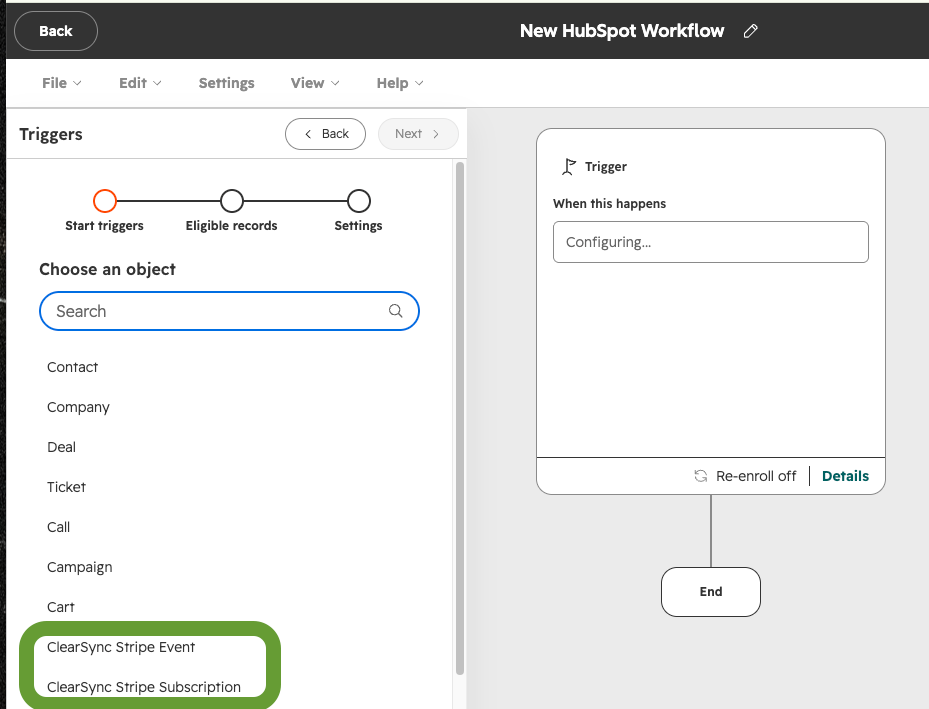
Start with a workflow based on the relevant ClearSync App Object; for example, you might want to create a Deal when a ClearSync Stripe Event recognizing positive MRR change is created.
A HubSpot workflow can:
- Enroll when a ClearSync Subscription or Event is created or when a relevant property changes.
- Delay briefly when downstream ClearSync associations or related records need time to finish syncing.
- Branch on event type, source, amount, associated company, or other available properties.
- Edit properties on the enrolled ClearSync record.
- Create a custom ClearSync Subscription or Event record when a business process requires it.
- Use HubSpot native association actions to associate ClearSync records with Companies, Contacts, Deals, Payments, or other supported records.
- Record processing status, timestamps, or other audit properties.
Using HubSpot’s native association actions
When you need to associate ClearSync data with your own Contacts, Companies, Deals, or Payments beyond what’s supported in ClearSync’s HubSpot configuration, we recommend trying HubSpot’s UI Workflow association actions first.
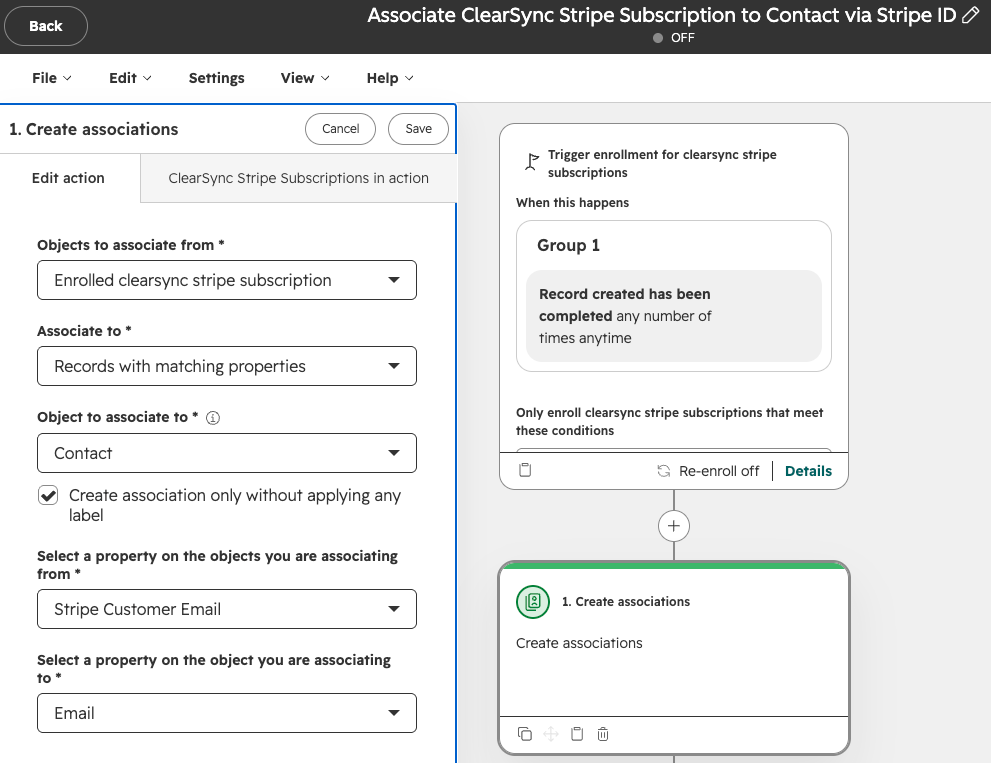
We recommend only using custom code actions for association logic when the target record must be found or selected using criteria that native actions cannot express.
Option 2: Custom code inside a HubSpot workflow
Requires HubSpot Data Hub Professional or Enterprise
A HubSpot custom code action within a workflow can run JavaScript or Python. Use it for advanced decision logic, calculations, lookups against integrated systems, or transforming data into outputs for later workflow actions.
A typical pattern is to:
- Enroll a ClearSync Event or Subscription record.
- Pass the required record properties into the custom code action.
- Have the code calculate a classification, amount, target record ID, or routing decision.
- Return those values as workflow outputs.
- Use native workflow actions to update the enrolled ClearSync record or create the required associations.
- Save an audit property that indicates how and when the record was processed.
Option 3: Workflow webhooks to an external service
Requires HubSpot Data Hub Professional or Enterprise
Use this pattern when HubSpot is the right place to define enrollment criteria, but an external service needs to run the decision logic. The external service must be able to complete its calculation or lookup synchronously and return the result in the webhook response.
A typical pattern is to:
- Have a ClearSync App Object workflow send the minimum required record data to the external endpoint.
- Have the endpoint authenticate the request, perform the calculation or lookup, and return the calculated values in its response.
- Expose the response values as workflow action outputs in HubSpot.
- Use later native workflow actions to update the enrolled ClearSync App Object record or create the required associations.
- Save processing status, timestamps, or another audit property so retries do not apply the same change twice.
This pattern does not give the external service direct API access to the ClearSync App Object record. The update still occurs through native actions inside the original HubSpot workflow. Do not assume an asynchronous callback can enroll a ClearSync App Object record.