
ClearSync Stripe Event app object records are created in HubSpot for every change to a Stripe Subscription’s MRR, making it easy to see MRR change over time in HubSpot:
MRR Change over time by Category [New, Upgrade, Downgrade, Churn]:
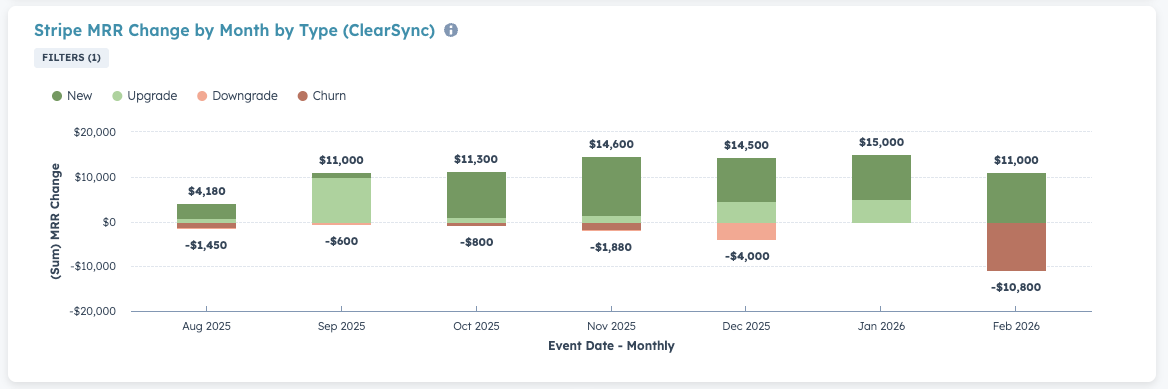
To create this report of MRR change over time by revenue category:
- Step 1: Go to Reports > Create Reports
- Step 2: Create a Custom Report > set the Primary Data Source to ClearSync Stripe Events
- Step 3: Click next, then configure the report:
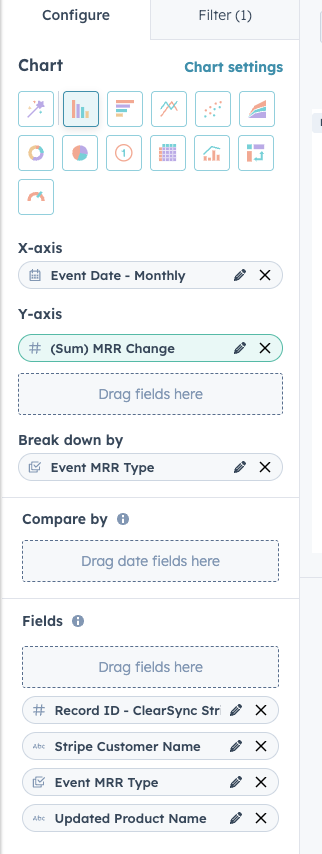
- (A) Under Chart, select the Vertical Bar report type
- (B) Search for Event Date in the left pane, then drag that field into the X-axis
- (C) Search for MRR Change in the left pane, then drag that field into the Y-axis
- (D) Search for Event MRR Type in the left pane, then drag that field into Break down by
- (E) Click Chart Settings, and:
- Set Stacked to “Standard”
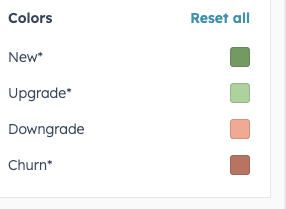
- Set more intuitive Colors for the different MRR types:
🏁 Save the report and optionally add it to a Dashboard
- Suggested Report Name: Stripe MRR Change by Month by Type (ClearSync)